 WhatsApp
Click-to-WhatsApp Ads in 2026: Setup, Cost and a 30-Second Lead Playbook
How Click-to-WhatsApp ads work in 2026, Meta's 72-hour free entry point, step-by-step Ads Manager setup, a qualification script that replies in seconds, and the metrics that prove ROI.
Table of contents
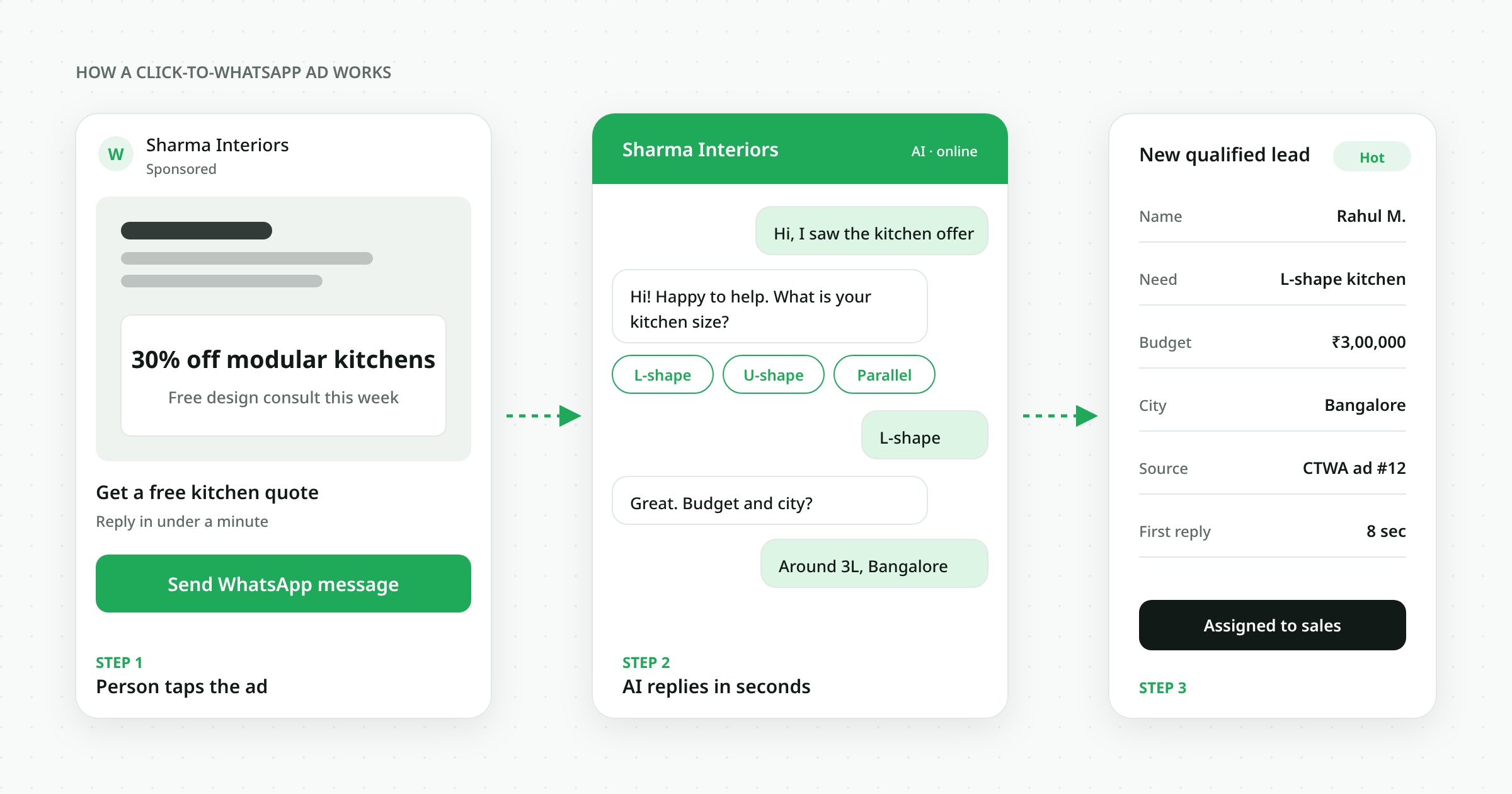
Click-to-WhatsApp (CTWA) ads are Facebook and Instagram ads whose button opens a WhatsApp chat with your business instead of a website. The person messages you first, so you get a warm conversation, their phone number and a chat history in one tap. When you reply within 24 hours, Meta opens a 72-hour free entry point window in which your messages to that person are not charged. See Meta's WhatsApp pricing documentation for the current rules.
- CTWA ads replace the form with a conversation, so there is no landing page to abandon.
- Replying within 24 hours unlocks a 72-hour window of free messages to that person.
- Speed decides the result: answer in seconds, not hours. An AI agent makes that possible around the clock.
- Track cost per qualified conversation and cost per sale, not cost per message.
- A pre-filled first message plus a short three-question script filters out low-intent clicks.
What are Click-to-WhatsApp ads?
A Click-to-WhatsApp ad is a normal Meta ad (Feed, Stories, Reels, Marketplace) with the destination set to WhatsApp. When someone taps the button, WhatsApp opens with a chat to your business number and an optional pre-filled message such as "Hi, I'd like the price list." They press send, and the conversation lands in your inbox.
Compared with a website lead form, three things change:
- Zero friction. No page load, no form fields, no "submit" button.
- Verified contact. You get a real, reachable WhatsApp number every time.
- Two-way from second one. You can ask questions, send a catalogue, a quote or a payment link in the same thread.
The 72-hour free entry point, explained
Since 1 July 2025 Meta bills WhatsApp Business messages per delivered template message. Conversations that start from a Click-to-WhatsApp ad or a Facebook Page call-to-action are a free entry point: if you respond within 24 hours, every message you send to that person — including template messages — is free for the next 72 hours.
Three days is enough to qualify, quote, follow up and close most small and mid-size deals without paying Meta a single message fee. Read the full breakdown in our WhatsApp Business API pricing guide.
The window only opens if you reply within 24 hours of the person's first message. A slow team literally pays more. Note that your ad spend is still billed by Meta Ads as usual — only the WhatsApp message fees are waived.
CTWA vs a landing page lead form
| Factor | Landing page / lead form | Click-to-WhatsApp ad |
|---|---|---|
| Steps to become a lead | Page load, fill fields, submit | One tap, press send |
| Contact quality | Typed by hand, often wrong | Real WhatsApp number |
| First response | Email or call, often hours later | Instant reply in the same chat |
| Follow-up channel | Separate email, SMS or call | Same WhatsApp thread |
| Message cost after click | Depends on channel | Free for 72 hours if you reply within 24 hours |
| Best for | Long research cycles, B2B content | High-intent local, retail, D2C, services, real estate, education |
Landing pages still win when buyers need to read a lot before talking. For anything where a quick question decides the purchase — price, availability, a demo slot, a site visit — a chat converts better because the buyer gets the answer immediately.
How to set up a Click-to-WhatsApp ad (step by step)
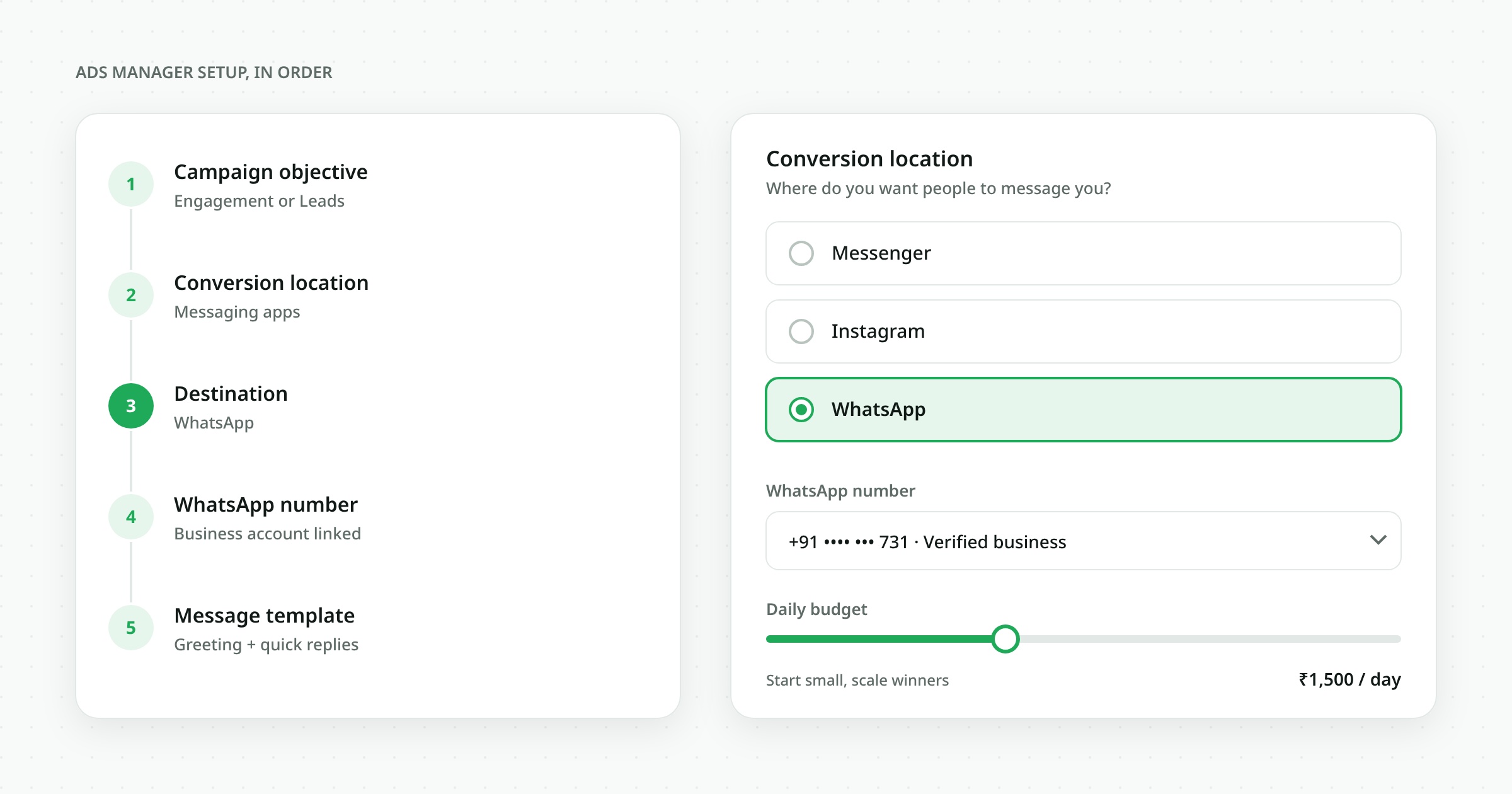
- Connect WhatsApp to your Facebook Page. In Meta Business Suite, open Settings → WhatsApp accounts and link the business number that runs on the WhatsApp Business Platform (API). Using the API, not the phone app, lets several agents and an AI assistant share the inbox.
- Create a campaign. In Ads Manager choose the Engagement objective (or Sales if you track purchases) and set the conversion location to Messaging apps → WhatsApp.
- Pick your audience and budget. Start narrow: a city or radius, an age band and two or three interests. Begin with a daily budget you can afford to test for 7 days.
- Write a pre-filled message. Make it specific so you know which ad the person came from — for example "Hi, I saw the 2BHK offer in Whitefield." Use a different message per ad set.
- Design the creative. Show the product or the outcome, put the offer in the first line, and end with the reason to chat: "Get today's price on WhatsApp."
- Prepare the reply before launch. Set up a greeting and the qualification flow below so nobody waits. Then publish and watch the first 50 conversations closely.
The 30-second qualification script
Speed is the single biggest lever. Leads contacted within the first minutes are far more likely to convert than leads contacted hours later, and on WhatsApp people expect a reply as fast as from a friend. See our WhatsApp response time benchmarks for what "fast" means in 2026.
Use three questions, then hand over to a person:
- Need: "Thanks for reaching out! What are you looking for — A, B or C?" (send as quick-reply buttons)
- Fit: "Which city or area are you in?" or "How many units do you need?"
- Timing: "When are you planning to buy — this week, this month or just exploring?"
Hot answers (this week, in your area, right quantity) go straight to a salesperson with the full chat. Everyone else gets a brochure, a price list or a booking link and an automatic follow-up inside the free 72-hour window.
Measure what actually matters
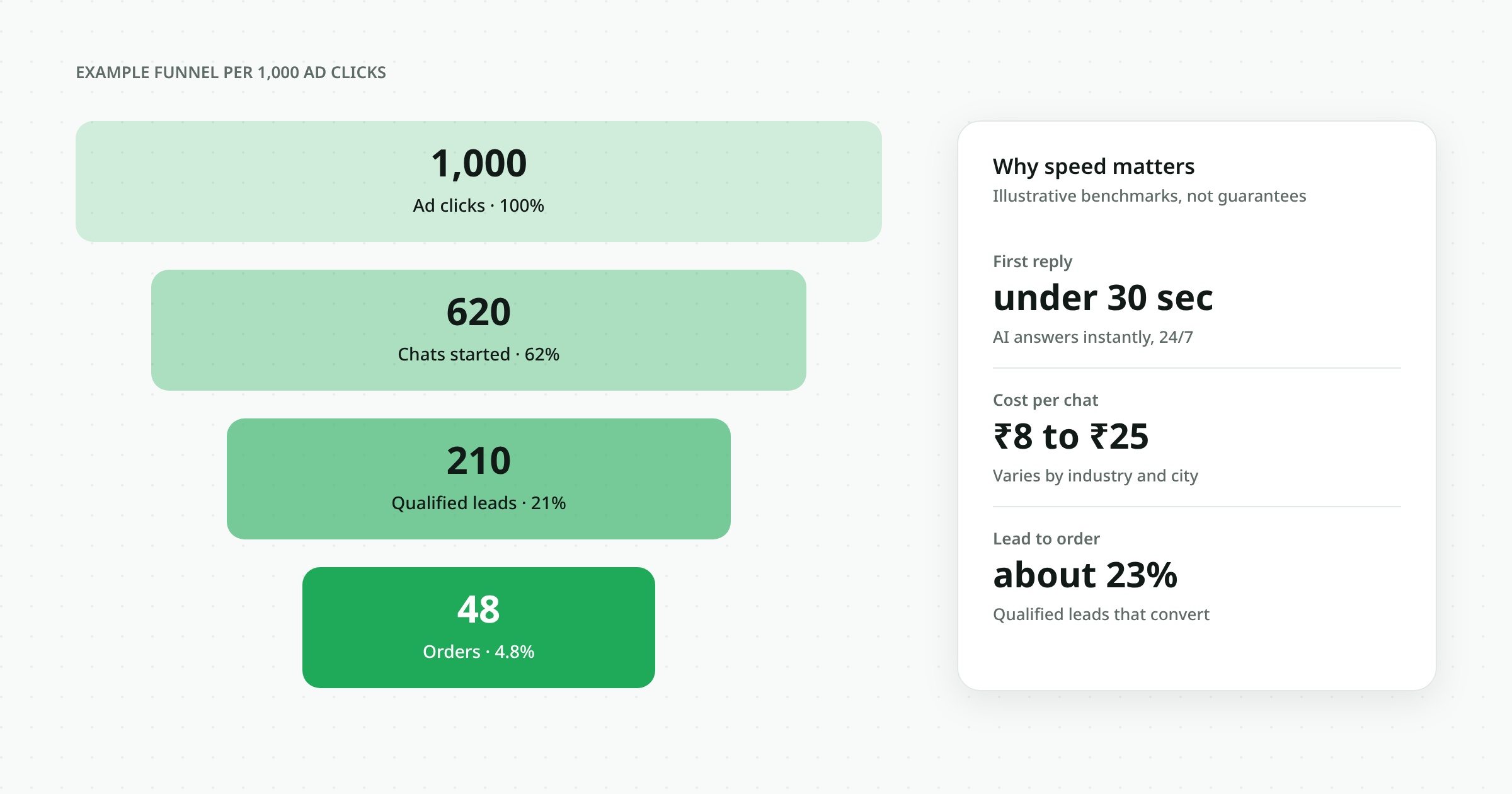
- Cost per conversation started — ad spend ÷ new chats.
- Qualification rate — share of chats that pass the three questions.
- First response time — aim for under one minute, every hour of the day.
- Cost per sale — ad spend ÷ orders that came from CTWA chats. This is the number that decides budget.
Send purchase events back to Meta through the Conversions API so the algorithm learns which chats turn into buyers, not just which people tap the button.
Common mistakes to avoid
- Running ads on the WhatsApp Business phone app, where one phone cannot handle volume or an AI assistant.
- No pre-filled message, so you can't tell which ad or offer started the chat.
- Replying after office hours only — and missing the 24-hour free window.
- Sending a wall of text. Use buttons, short lines and one question at a time.
- Judging the campaign on clicks instead of cost per sale.
Where WallzaOS fits
WallzaOS runs on the official WhatsApp Business Platform. Every Click-to-WhatsApp chat lands in one shared team inbox with the ad it came from, an AI agent replies in seconds and runs your qualification questions, and hot leads are assigned to the right salesperson with the full history in the built-in CRM. There is no per-message markup on top of Meta's rates — see pricing, explore features and the AI agent, or compare us with WATI and AiSensy.
Frequently asked questions
Are Click-to-WhatsApp ads free?
No. You pay Meta for the ad itself. What is free is the WhatsApp messaging that follows: reply within 24 hours and your messages to that person are free for 72 hours.
Do I need the WhatsApp Business API for CTWA ads?
You can run CTWA ads with the WhatsApp Business app, but the API lets multiple agents, automation and an AI assistant handle the chats, and is required for the free entry point to apply to template messages.
Which campaign objective should I choose?
Use Engagement with WhatsApp as the destination to maximise conversations, or Sales when you send purchase events back through the Conversions API.
How fast should I reply to a CTWA lead?
Within a minute if possible. Fast replies convert better, and you must reply within 24 hours to unlock the 72-hour free window.
Can I track which ad brought a lead?
Yes. Use a different pre-filled message per ad set, and the ad's referral data arrives with the first message on the API.
Frequently asked
Are Click-to-WhatsApp ads free?
No. You pay Meta for the ad. Reply within 24 hours and your WhatsApp messages to that person are free for 72 hours.
Do I need the WhatsApp Business API for CTWA ads?
Not strictly, but the API lets multiple agents, automation and AI handle the chats and is needed for the free entry point to cover template messages.
Which campaign objective should I choose?
Engagement with WhatsApp as the destination, or Sales when you send purchase events through the Conversions API.
How fast should I reply to a CTWA lead?
Within a minute if possible, and always within 24 hours to unlock the 72-hour free window.
Can I track which ad brought a lead?
Yes. Use a different pre-filled message per ad set; the ad referral data also arrives with the first message on the API.
The Wallza OS research team covering customer messaging, AI automation and revenue operations.
Run every customer conversation in one place
WallzaOS brings WhatsApp, Instagram, Messenger and email into a single AI-assisted inbox — with quotes, follow-ups and payments built in.
