 WhatsApp
How to Send Bulk WhatsApp Messages Without Getting Banned (2026 Guide)
The safe way to send bulk WhatsApp messages in 2026: official API vs unofficial tools, Meta's 250 to unlimited messaging limits, quality rating, opt-in, templates and a 4-week sending plan.
Table of contents
- Why WhatsApp numbers get banned
- Official API vs unofficial bulk senders
- WhatsApp messaging limits in 2026
- Quality rating: the number that decides everything
- Collecting opt-in the right way
- Writing templates that get approved
- A 4-week sending plan for new numbers
- Pre-send checklist
- What bulk messaging costs
- Sending bulk messages with WallzaOS
- Frequently asked questions
- Can I send bulk WhatsApp messages without getting banned?
- How many WhatsApp messages can I send per day?
- Is the messaging limit set per phone number?
- What gets a WhatsApp number blocked?
- Is the WhatsApp Business app's broadcast feature enough?
- Do I pay for every bulk message?
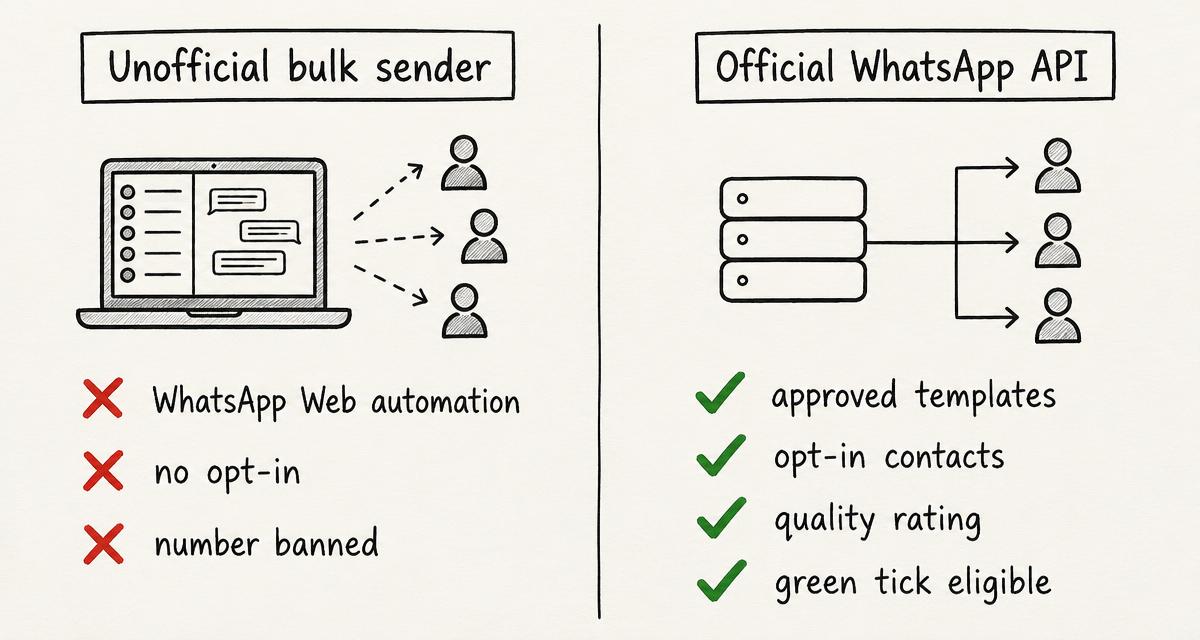
To send bulk WhatsApp messages without getting banned, use the official WhatsApp Business Platform (API), message only contacts who have opted in, send pre-approved templates, and grow volume gradually while watching your quality rating. New accounts can reach 250 unique people a day. Verifying your business raises that to 2,000, and Meta then scales you up to unlimited automatically. Source: Meta messaging limits documentation.
- Bans almost always come from unofficial tools, cold lists or high block rates, not from volume alone.
- Messaging limits count the unique people you start conversations with in 24 hours, not total messages.
- Since October 2025 the limit is shared across your whole business portfolio.
- Verify your business on day one to jump from 250 to 2,000.
- Segment, personalise and give people an easy way to opt out. Few blocks keep quality high and unlock higher tiers.
Why WhatsApp numbers get banned
WhatsApp protects users from spam, and its systems watch how people react to your messages. If many people block or report you, or your sending pattern looks automated through the consumer app, your number gets restricted or banned. The most common causes are:
- Unofficial "bulk sender" software or Chrome extensions that automate WhatsApp Web. These break WhatsApp's terms.
- Bought or scraped lists. People who never asked to hear from you block fast.
- The same promo, too often. Daily offers to your whole list push block rates up.
- No easy way to opt out. If people cannot say "stop", they press Block instead.
- Sudden spikes from a brand-new number with no history.
Official API vs unofficial bulk senders
| Unofficial bulk sender | WhatsApp Business app | Official WhatsApp API | |
|---|---|---|---|
| Allowed by WhatsApp | No | Yes | Yes |
| Ban risk | Very high | Medium at volume | Low when opt-in and quality are managed |
| Daily reach | Until banned | Broadcast lists, only contacts who saved your number | 250 → 2,000 → 10K → 100K → unlimited |
| Automation and chatbots | Fragile | Basic quick replies | Full: flows, AI agents, CRM |
| Team inbox | No | Limited devices | Many agents through a platform |
| Green tick eligible | No | No | Yes |
If you need volume, the API is the only route that scales. See our WhatsApp bulk sender feature for how it works in practice.
WhatsApp messaging limits in 2026
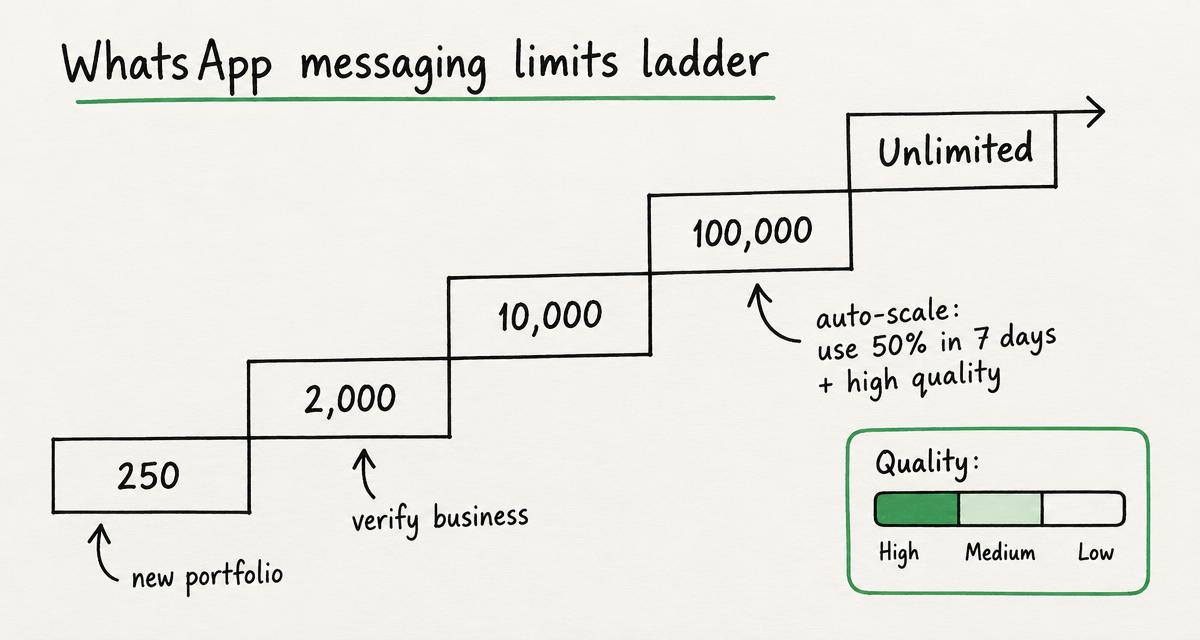
A messaging limit is the maximum number of unique WhatsApp users your business can start conversations with, outside a customer service window, in a moving 24-hour period. Replies to customers who messaged you first do not count.
| Tier | Unique people per 24 hours | How you get there |
|---|---|---|
| Starting | 250 | New business portfolio |
| Tier 1 | 2,000 | Verify your business, or send 2,000 high-quality template messages to unique users in 30 days |
| Tier 2 | 10,000 | Automatic scaling |
| Tier 3 | 100,000 | Automatic scaling |
| Unlimited | No cap | Automatic scaling |
Automatic scaling requires good message quality and using at least half of your current limit over recent days. Since 7 October 2025, limits are set per business portfolio and shared by all numbers in it, so adding extra numbers no longer multiplies your reach. Upgrades now happen within about 6 hours. Sources: Meta messaging limits and Meta's October 2025 change notice.
Quality rating: the number that decides everything
Every number shows a quality rating of High (green), Medium (yellow) or Low (red) in WhatsApp Manager. It is based on recent feedback from users, such as blocks and reports. Templates have their own quality rating too. Meta can pause low-quality templates, and poor quality stops you from moving up a tier.
How to keep it green:
- Send to recent, engaged contacts first.
- Start with 1–2 marketing messages per week per person, then adjust based on your own block data.
- Personalise with the customer's name, last order or city. Generic blasts get blocked.
- Add a "Stop promotions" quick-reply button to every marketing template.
- Pause a template as soon as its quality drops, then rewrite it.
Collecting opt-in the right way
WhatsApp requires people to agree to receive messages from your business. Good opt-in sources include:
- A checkbox at checkout: "Send order updates and offers on WhatsApp".
- A click-to-chat link or QR code on your website, packaging and store counter.
- Click-to-WhatsApp ads, where the customer messages you first.
- A WhatsApp-number field on lead forms, with clear wording about what you will send.
Record when and where each person opted in. That record matters if you ever need to answer a complaint.
Writing templates that get approved
Every business-initiated message on the API uses a template that Meta reviews. Pick the right category: Marketing (offers and launches), Utility (order, delivery and payment updates) or Authentication (one-time passwords). These tips speed up approval:
- State your business name and why the person is receiving the message.
- Use variables such as {{1}} for a name or order number, and include sample values.
- Avoid misleading urgency, all-capitals shouting and shortened mystery links.
- Add buttons: a link, a quick reply or "Stop promotions".
- Do not disguise a promotion as a utility message. Meta will re-categorise it, and it can hurt trust.
Example marketing template:
Hi {{1}}, our winter collection is live at {{2}}. As a past customer, you get early access until Sunday. Tap below to browse. Reply STOP to opt out.
A 4-week sending plan for new numbers
| Week | Who to message | Goal |
|---|---|---|
| Week 1 | Utility messages and your most loyal customers | Build a sending history, verify your business, reach the 2,000 tier |
| Week 2 | Buyers from the last 90 days | Keep blocks very low and use more than half your limit |
| Week 3 | Opted-in leads and older buyers, in segments | Earn automatic scaling to 10K |
| Week 4+ | Your full opted-in list, split by interest | Keep a steady weekly rhythm and test templates |
This is a practical plan, not a Meta rule. Meta scales your limit based on quality and usage, not calendar weeks.
Pre-send checklist
- Every contact has opted in, and you have recorded the date and source.
- Numbers use the international format, such as +91 98xxxxxxxx.
- Your audience is segmented. Never use "send to all".
- The template is approved, and its quality is not Low.
- Your limit covers the audience, or you have split the send across several days.
- The template has an opt-out button, and opt-outs are removed automatically.
- Your team or AI agent can answer replies within minutes.
What bulk messaging costs
On the API, you pay Meta for each delivered template message. The rate depends on the message category and the recipient's country. Marketing costs the most, utility and authentication cost less, and service replies inside the 24-hour window are free. See the full breakdown in WhatsApp Business API pricing 2026. Watch for platforms that add their own markup to Meta's rate for each message. Our AiSensy vs WATI vs DoubleTick comparison explains how to check.
Sending bulk messages with WallzaOS
WallzaOS runs on the official WhatsApp Business API. You can upload or sync opted-in contacts, segment them, schedule template campaigns within your limit, remove opt-outs automatically, and let an AI agent answer replies in a shared inbox. The same verified business setup is also what you need to apply for the green tick later.
Start free with WallzaOS or book a demo.
Frequently asked questions
Can I send bulk WhatsApp messages without getting banned?
Yes. Use the official WhatsApp Business Platform (API), message only people who opted in, use approved templates and keep your quality rating high. Unofficial tools that automate WhatsApp Web break WhatsApp's terms and are the main cause of bans.
How many WhatsApp messages can I send per day?
New business portfolios can start conversations with 250 unique people in any rolling 24 hours. Verifying your business unlocks 2,000, and Meta then scales you automatically to 10,000, 100,000 and unlimited. Replies to customers who messaged you first do not count.
Is the messaging limit set per phone number?
No. Since 7 October 2025, the limit is set per business portfolio and shared by every number in it.
What gets a WhatsApp number blocked?
High block and report rates, messaging people who never opted in, sending the same promotion too often and using unofficial automation tools.
Is the WhatsApp Business app's broadcast feature enough?
Only for small lists. Broadcasts from the Business app reach only people who saved your number, and the app is not built for automation or large volumes.
Do I pay for every bulk message?
On the API, Meta charges for each delivered template message, based on its category (marketing, utility or authentication) and the recipient's country. Undelivered messages are not billed.
Frequently asked
Can I send bulk WhatsApp messages without getting banned?
Yes. Use the official WhatsApp Business API, message only opted-in contacts, use approved templates and keep your quality rating high. Unofficial WhatsApp Web automation tools are the main cause of bans.
How many WhatsApp messages can I send per day?
New business portfolios can reach 250 unique people per rolling 24 hours. Business verification unlocks 2,000, then Meta scales automatically to 10,000, 100,000 and unlimited. Replies to customers who messaged first do not count.
Is the messaging limit set per phone number?
No. Since 7 October 2025, the limit is set per business portfolio and shared by every number in it.
What gets a WhatsApp number blocked?
High block and report rates, messaging people who never opted in, sending the same promotion too often and using unofficial automation tools.
Do I pay for every bulk message?
Meta charges for each delivered template message by category and country. Undelivered messages are not billed.
The Wallza OS research team covering customer messaging, AI automation and revenue operations.
Run every customer conversation in one place
WallzaOS brings WhatsApp, Instagram, Messenger and email into a single AI-assisted inbox — with quotes, follow-ups and payments built in.
